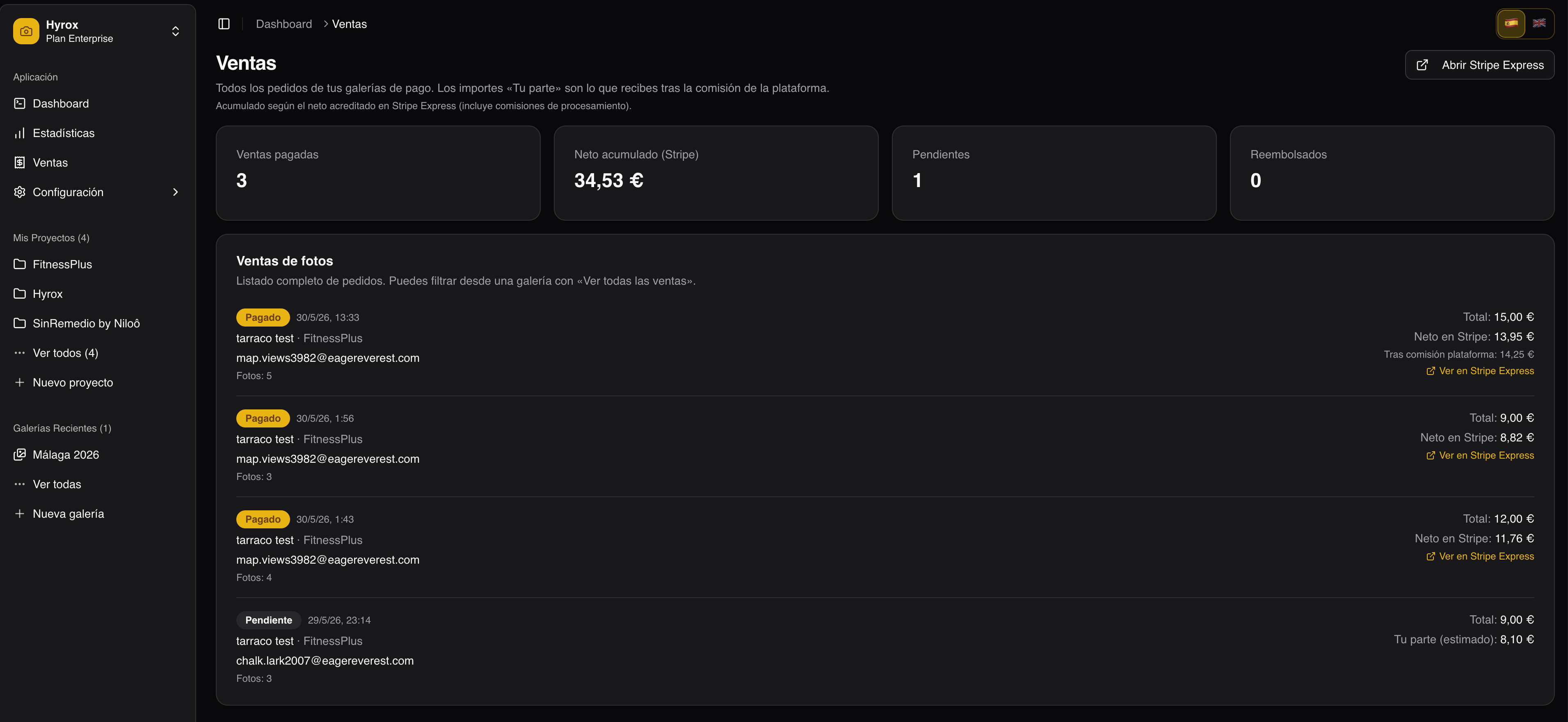
New feature: sell gallery photos online 💳
You can now turn your Ftens galleries into a professional storefront: clients pay, get instant access, and download only the photos they purchased—without watermarks. You get paid via Stripe Connect and manage everything from the same dashboard where you already upload and deliver work.
Best of all: you can start selling on the free plan. You do not need a paid subscription to try the full flow with real clients.
Who is it for?
If you shoot weddings, events, portraits, sports, or corporate work and want to stop relying on ad‑hoc links, WeTransfer, or folders with no control, integrated gallery sales on Ftens is built for you:
- One gallery link for preview and purchase
- Watermarked previews until they pay
- Secure card checkout (Stripe)
- A Sales hub with orders and a link to Stripe Express
Platform fee by plan
Sales are available on every plan (Free, Basic, Pro, and Advanced). The platform fee depends on your subscription:
| Plan | Sales | Typical fee |
|---|---|---|
| Free | ✅ Yes | 10% |
| Basic | ✅ Yes | 5% |
| Pro | ✅ Yes | 0% |
| Advanced | ✅ Yes | 0% |
The fee is withheld automatically on each sale; the dashboard shows estimated net amounts and, once Stripe confirms, the net credited in Express.
On the free plan, paid galleries always use the Ftens watermark on previews (not your project logo). On paid plans you can choose between the Ftens logo or your project logo.
How it works (4 steps)
1. Start with the plan you already have (including free)
You do not need Pro or Advanced to sell. On the free plan, you can already create paid galleries and get paid through Stripe. As your volume grows, upgrading reduces or removes the platform fee.
Check your plan under Settings → Plan.
2. Connect Stripe once
Under Settings → Account, link your account with Stripe Connect (Express)—fast onboarding, payouts in your currency, and an Express dashboard for payments and transfers.
3. Set the gallery to “Paid” and define pricing
In each gallery, under Photo sales, choose paid mode and set options:
| Type | Best for |
|---|---|
| Per photo | Unit price; client picks individual images |
| Pack | Fixed count (e.g. 10 photos) at one price |
| Full gallery | All public photos in the gallery |
You can offer several options at once (e.g. single photo + 15‑photo pack + full gallery). Changes go live on the public gallery immediately.
4. Share the link and get paid
Clients open your gallery (public or password‑protected), browse watermarked previews, pick a pack, and pay. After checkout:
- They receive a confirmation email with an access link
- They can restore access with the same email on another device
- They download only purchased photos in full quality
Client experience
We designed the flow for guests buying on their phone after a wedding or event:
- Clear photo and pack selection
- Stripe Checkout (card, Apple Pay, Google Pay where available)
- Acceptance of purchase terms before payment
- Ongoing access without asking you for a new link
Photographer dashboard
Per gallery
- Recent sales summary
- Order list: buyer, date, amount, photos, status
- View in Stripe Express for payment details in Stripe
“Sales” menu
A global view of all orders across paid galleries, totals, and filter by gallery—handy when you run many events per month.
Security and trust
- Protected previews: on paid galleries, originals are not served without purchase; public view shows watermarks only
- Stripe handles payments: Ftens does not store card data
- Refunds: if you refund in Stripe, buyer access is revoked automatically
- Legal: purchase terms and privacy policy linked at checkout and in the confirmation email
Protecting buyers when you delete galleries
If you sold photos and later delete the gallery, it does not vanish instantly: a notice period (15 days) applies, buyers are emailed so they can download their photos, and only then is content removed. The same rules apply when deleting a project that still contains galleries with sales.
You can cancel a scheduled deletion from the gallery settings if you change your mind.
FAQ
Can I sell on the free plan?
Yes. Sign up for free, connect Stripe, and create your first paid gallery. Your plan’s platform fee applies (10% by default on Free).
Do I need a separate Stripe account?
You connect (or create) a Stripe account through Connect Express from Ftens. Gallery sales are paid to that account.
Can I still deliver galleries for free?
Yes. Each gallery can be free (downloads per your plan) or paid—your choice per gallery.
How do I lower the platform fee?
Upgrade to Pro or Advanced to sell with no platform fee (0%). The Basic plan typically has a lower fee in between (5% by default).
What if my client loses the link?
They can use Restore access on the gallery with their purchase email.
What currency do I charge in?
You set prices in the gallery currency (EUR by default). Stripe processes payment through your Connect account.
Can I sell only some photos from a large gallery?
Yes. Clients select photos on the public gallery (except “full gallery”, which includes public photos they do not already own).
Get started (free)
- Create your account or sign in—the free plan already includes sales
- Connect Stripe
- Open a gallery → Photo sales → enable Paid and save your packs
Ready to monetize deliveries without leaving Ftens?
Pro tip: For weddings, offer a mid‑size pack (15–25 photos) plus full gallery as an upsell—it often converts better than per‑photo pricing alone.
Ftens — Professional galleries that sell for you.